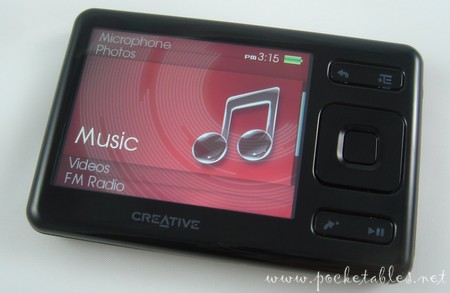
Although it wasn't what many originally had in mind as a replacement for the Zen Vision:M, the applauded HDD-based DAP that debuted in 2006, the Creative ZEN has still been regarded positively for its wide array of features, brilliant 2.5-inch display, bar-setting internal flash storage capacities (32GB as of today), and memory card expansion slot.
Introduced in August 2007, Creative's flagship device is a capable digital media player in its own right, but is it a worthy successor to the Vision:M? Read my full ZEN review below to find out.
This review is based on the Creative ZEN running firmware version 1.20.02 (released December 2007).
System Specifications
| Capacities: |
2GB, 4GB, 8GB, 16GB, 32GB |
| Expansion: |
SD card slot (compatible with microSD, miniSD, SD, and SDHC) |
| Supported audio: |
MP3, WMA, WMA-DRM, WAV, AAC, Audible |
| Supported video: |
MPEG4-SP, WMV9, DivX, XviD, MJPEG |
| Extras: |
Photo viewer, FM radio, voice recorder, organizer (contacts, calendar, tasks), alarm |
| Display: | 2.5” TFT (320 x 240, 16.7M colors) |
| Dimensions: | 3.26" x 2.16" x 0.44" |
| Weight: | 2.1 ounces |
| Colors: |
Black |
Take a look at my Creative ZEN unboxing for photos of the player's packaging and accessory bundle.
Design
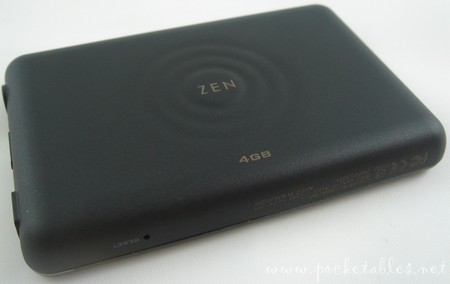
The ZEN is composed of two plastic pieces that vary in texture (smooth and glossy on the front, textured and matte on the back) but are both generally resistant to cosmetic scratches and everyday wear and tear.
The all-black player's rounded edges and clean lines give it an understated look worthy of the minimalist's approval, while the sturdy construction and overall build quality make it an appealing choice for the user looking for something both stylish and strong.
Size
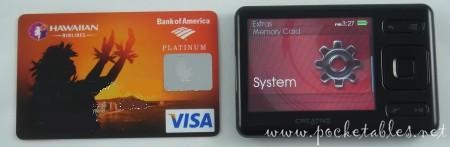
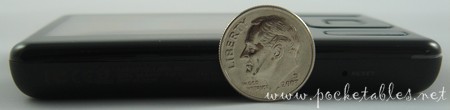
Since its late-summer launch, Creative has been comparing the ZEN to a credit card to give consumers an immediate idea of its compact size.
Here are some additional photos of the device beside other common objects:
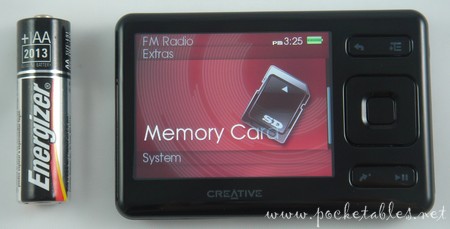
Measuring 3.26 x 2.16 x 0.44 inches and weighing a scant 2.1 ounces, the player is an easy fit for pockets and a comfortable size for the hand.
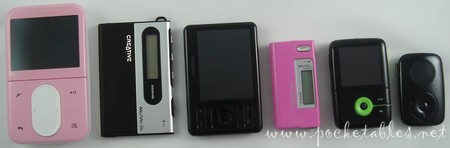
Although Creative could still release another HDD-based player in the future, the ZEN is generally understood to be the flash-based replacement of the Zen Vision:M (left). Reactions continue to be mixed, but with the ZEN maintaining the Vision:M's 2.5-inch screen and now being available with 32GB of built-in flash (and having an SD card slot), I don't have any complaints.
Shown alongside the Vision:M and ZEN in the photo above are some of the other members of Creative's portable media player family: MuVo Slim, MuVo N200, Zen V, and Zen Stone Plus.
Compared to other companies' flash players, the ZEN is mid-sized and uneventfully thick. From left to right (above) and bottom to top (below) are the Samsung P2, Sony A810 Walkman, Toshiba gigabeat T400, Creative ZEN, iriver clix 2, and 3G Apple iPod nano.
Display
The majority of the ZEN's face is devoted to its glorious 2.5-inch display, which keeps the Vision:M's 320 x 240 resolution but increases its color-reproducing capabilities to a stunning 16.7 million (versus 262K).
The screen is so colorful and bright that not only did I keep all 94 images that came preloaded on the player, but I actually still look at them every few days as well (as of today, I've had my ZEN for about 2 months). Photos are simply gorgeous.
How long you're able to comfortably look at a screen of this size depends on your eyesight, but 2.5 inches is a real sweet spot for me. I actually think it's an ideal size for a portable device whose primary function is not video playback (and that doesn't have a touchscreen).
And even though there really isn't a need for it, I should still mention that the display orientation cannot be switched to portrait mode. Since most portrait players can be rotated into landscape mode, anyone who expects the reverse to be true should know that the ZEN is a landscape-only device.
Controls
Creative left behind the vertical touchpad of the Vision:M and opted instead for strictly tactile hardware controls.
Even though the controls are a bit too flush for my liking and look a bit like they've been stamped out with cookie cutters and are still waiting for the "cookies" to be removed, they make an extremely pronounced "click" sound when pressed and are easy to use.
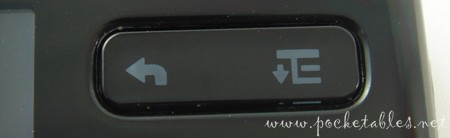
The rocker-style button at the top contains the back/menu (press to return to previous screen, press and hold to go to the main menu) and options (press to bring up context menus within other menus) controls.
The square control in the middle is the four-way directional pad and OK button used to navigate through the ZEN's system.
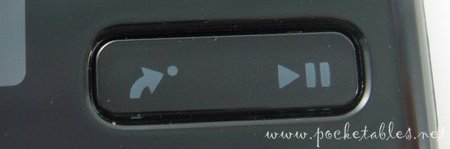
Below the square is another rocker-style button. The right side takes care of media playback, while the left is a user-assigned control called My Shortcut. Also found on the Vision:M, the My Shortcut button can be used to access one of seven commonly used functions.
Volume is probably one of the most popular functions because the ZEN doesn't have any hardware buttons dedicated to volume control.
What it has instead are a mini-USB port (for charging and connecting to a PC), power/hold switch, and headphone jack on the right side; a reset hole on the bottom; and a microphone and SD card slot on the top.
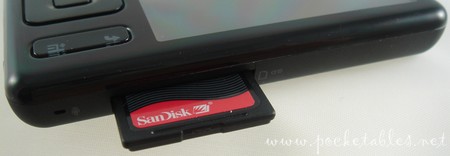
SD card slot
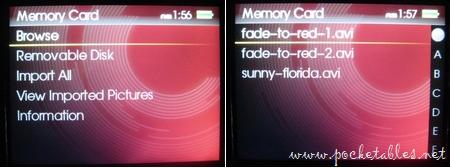
The memory card slot supports microSD and miniSD (with SD adapters), SD, and SDHC cards. Cards are treated as removable storage by a computer, so content can be transferred through simple drag-and-drop using Windows Explorer.
As others have noted, media transferred to a memory card is not integrated with media stored on the player itself. Separate libraries aren't an issue for me because I keep music on the ZEN and movies on an SD card, but I understand how frustrating the separation can be. For example, if you kept 200 songs on the ZEN and another 200 on a card, you'd need to search in two different locations (Main Menu -> Music -> All Tracks and Main Menu -> Memory Card -> Browse) just to find what you want.
User Interface
The patented user interface (UI) found on other Creative players has been cosmetically enhanced for the ZEN and features oversized glass-like icons and submenu overlays.
Beneath the makeover lies the same well organized, straightforward, and easy-to-use UI that Creative fans have come to know and love (and that Apple paid $100 million to continue using on iPods), so navigation is a breeze. Paired with the self-explanatory tactile controls, the UI has virtually no learning curve.
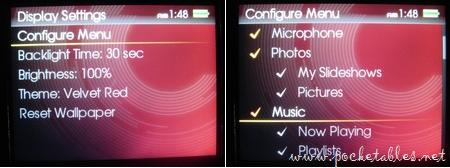
One of the nice things about the interface is that the main menu can be configured to each user's personal liking. If a particular feature has no value to you, just remove it from the menu. The menu doesn't wrap around itself (i.e., once you reach the bottom, it doesn't continue from the top), so one less menu item to scroll through can be a welcomed omission.
It actually doesn't make sense for the main menu not to wrap because the submenus, context menus, and media lists all do.
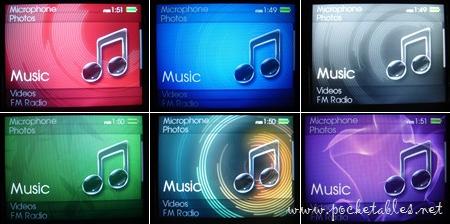
In addition to being able to set any photo, including zoomed-in portions, as wallpaper with various effects applied and brightness levels adjusted, the ZEN can be personalized with a set of six themes: (clockwise from top left) velvet red, marine blue, sable black, royal purple, neon orange, and forest green.
Transferring Content
The ZEN is an MTP-based media player and is compatible with Windows XP SP2 and Vista computers. Apart from loading media to a memory card or finding a hack (if it exists) to make it work with OS X, Mac users should probably skip the Creative aisle when shopping for a new DAP.
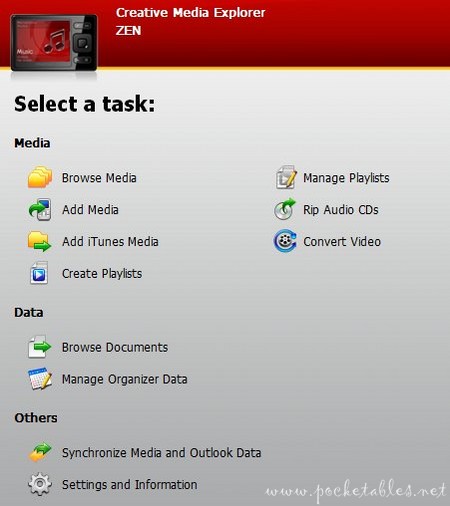
Windows users, on the other hand, have a nice array of music management software and other options to choose from. My first choice is also good ole' drag-and-drop using Windows Explorer, but those who want to manage playlists, transfer AAC files, or convert video will need to use a program like the included Creative Media Explorer or Sync Manager, Windows Media Player, Media Monkey, Winamp, and so on.
Once content is transferred, it can be deleted directly from the player without the use of a computer.
Transferring video
Unlike the Vision:M, the ZEN will only play 320 x 240 video resolutions and is very finicky about codecs. So just because XviD and DivX are both listed as supported video formats doesn't mean that the player will catch everything you throw at it. The ZEN isn't DivX-certified so it may not play all DivX 4 and 5 files (MPEG1 and MPEG2, for example, may need to be transcoded); XviDs should play if they're encoded as MPEG4-SP or MPEG-4 ASP without GMC and QPEL support.
My favorite DVD-ripping program, and the one I use for every portable device that comes into my hands, is CloneDVD mobile by SlySoft. Using the generic DivX setting, a bitrate below 1500kbps to keep the file size manageable, and an output resolution of 320 x 240, I've encountered absolutely no problems with getting video on the ZEN.
This is the only method I use and the only one I've tried, so if you're having trouble loading videos and don't want to download CloneDVD mobile (a 21-day free trial is available), be sure to visit the epiZENter forums for help.
Audio
Though your ears and headphones may tell you different, I consider Creative to be among the best-sounding DAP brands around. It may not be the best, but it's definitely above average and should make most listeners very happy. Sound quality is warm, bright, clear, and balanced.

Scrolling through long lists of items is quick and easy thanks to the alphabet bar on the right-side of selected menus. While music is playing, the track can be rated for use with the DJ function (more on this below), album art can be viewed in full screen, and similar songs can be searched for using the "Lookup Artist" option in the context menu.
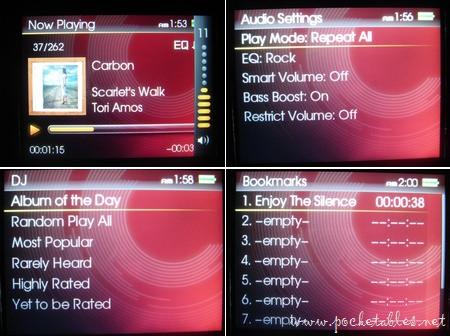
The ZEN has 25 volume levels, 6 play modes (normal, repeat track, repeat all, shuffle, shuffle repeat, track once), 5-band custom EQ, 8 preset EQs (acoustic, classical, disco, jazz, new age, pop, rock, vocal), and the ability to set up to 10 bookmark s within audio tracks.
DJ
One of the most unique components of the ZEN's audio feature set is the DJ function, which selects songs based on your previous listening habits. You can see the options in the image above and they're all self-explanatory, but here they are again with a corresponding description thrown in from the user's guide for good measure:
- Album of the Day: Plays any album.
- Random Play All: Plays all tracks, including your recorded tracks, in random order.
- Most Popular: Plays frequently played tracks.
- Rarely Heard: Plays rarely heard tracks.
- Highly Rated: Plays tracks that you have rated highly.
- Yet to be Rated: Plays tracks you have yet to rate.
Video
As mentioned in the "Display" section above, the ZEN's 2.5-inch screen (320 x 240, 16.7M colors) is vibrant and colorful, making videos an absolute pleasure to watch.
Videos cannot be bookmarked, but they can be fast-forwarded, rewound, and adjusted to fit or fill the screen. Video folders can also be protected; whether protected folders are shown or hidden can be set through Main Menu -> System -> Player Settings -> Protected Content: Show or Hide. Gee, I wonder what you could be watching that you wouldn't want others to know about.
Regardless of what you choose to watch on a 2.5-inch display, video runs smoothly and looks fantastic on the ZEN.
Extras
Like a lot of players these days, the Creative ZEN can do a lot more than just play music and video.
Photo viewer
Again because of its brilliant display, the player is well suited for viewing photos.
JPG files can be rotated, zoomed in, rated, deleted, set as wallpaper with various photo effects (original, warm, cool, gray, sepia) applied, and viewed as part of a slideshow (with or without transitions) while listening to music.
Like video folders, photo folders can also be hidden from the prying eyes of your spouse, parents, children, and whoever else you don't want seeing whatever it is that you're looking at.
FM radio
The FM radio is on par with most tuners found on others players on the market. Reception is good (in Honolulu, anyway), and stations can be automatically or manually scanned and saved as one of 32 presets.
Unlike other DAPs, the ZEN does not have an FM recording feature.
Voice recorder
It does have a voice recorder, though.

Using the built-in microphone located at the top of the player, you can record personal notes and other audio in WAV format, split long sessions into separate files, and delete recordings at will.
Organizer
The ZEN also has a few read-only PIM functions.
Microsoft Outlook users can sync their calendar events, contacts, and task lists using Creative's Sync Manager or Media Explorer. Non-Outlook folk can click on the Manage Organizer Data option in Media Explorer to add and edit PIM information.
Alarm
If you keep the ZEN hooked up to a set of external speakers overnight, you can use the player as an alarm clock. Settings are accessed through Main Menu -> Extras -> Data & Time -> Options button -> Set alarm or Main Manu -> System -> Clock Settings -> Set Alarm.
Both paths lead to the same place and allow you to set a daily or one-time alarm with a random track or FM radio used as the alarm sound.
Battery Life
The ZEN's non-removable lithium ion has a rated battery life of up to 30 hours for audio and 5 hours video for video playback, but actual runtime will vary according to brightness settings, bitrate, and other variables.
Conclusion
Creative did a lot of things right with the ZEN. It kept the screen size of its predecessor but dramatically increased the number of supported colors, updated the patented user interface without messing with what made it successful in the first place, opted for all tactile controls, and added an SD card slot for memory expansion. The ZEN also maintains the excellent sound quality and general performance many expect from Creative and offers some new features not seen on any of the company's previous players.
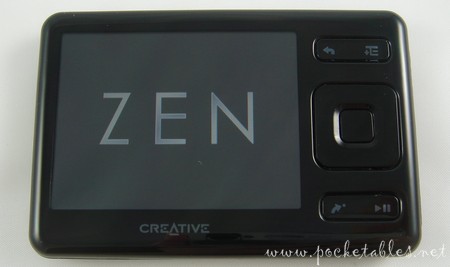
While there are still areas in need of improvement (e.g., SD card content integration), what the ZEN is able to do now, it already does well. Coupled with the fact that it's well priced and available in capacities up to 32GB, the Creative ZEN fills the shoes left behind by the Vision:M with no problem. Though it may not be the successor most fans had in mind, it's certainly worthy of the title.
The Creative ZEN can be purchased from a variety of online retailers throughout the world. Storage capacity and pricing vary by location, but Amazon generally has the best prices. Check out current prices, which typically range between $93 (4GB) and $195 (16GB), of the ZEN at Amazon.


At last, Jenn! Your review about the Zen is ready!!
An what a review it is!
Have you tried loading podcasts, especially from Itunes? …From an Ipod Touch owner but interested in Creative’s DAPS
I’m with philz on this one. Totally worth the wait but wish the wait had been shorter.
Do you know when the 32 GB will be out and what it will cost?
Keep up the great work and awesome reviews!
@ Jenniannie: ZENcasts (as Creative calls them) can be added, subscribed to, and managed using the supplied ZENcast Organizer. Take a look at the ZENcast website for more info and to download the software.
Podcasts from iTunes can be transferred as standard MP3 files with no problem. AAC files should transfer without issue as well, but I haven’t tried them. Anything in Quicktime format can’t be loaded onto the ZEN using any of Creative’s supplied software, but I’m sure there are third-party conversion programs to work around this.
@ philz & Lisa: I didn’t realize it actually took as long as it did. The holidays and CES really messed with my timetable! Thanks for putting up with my procrastination.
As of today, the 32GB model is $299 (it was $349 when first announced) and it’s available in the U.S. now. Or it used to be, anyway. It began shipping in December I think, but now most places list it as either out of stock or coming soon.
Well, I think, it isn’t too bad that the SD-card isn’t fully integrated in the music-/video-/photo-library because it can be useful. For example you had shot a few photos with your digital camera and want to view the shots on your Zen, but you already have hundreds of photos in your Photo Library, so you can see easily which photos are from your SD-card
PS: Please excuse me, that my English is not so good, but I’m from Germany and only twelve years old
Great point, philz. I’m so accustomed to using memory sticks in my digital cameras that I never considered the usage scenario you mentioned. What would be great is if the contents could be fully integrated in the music, video, and photo areas of the system, yet still accessible separately through the memory card area.
@ Jenn
Right.
Jenn, which DAP (in Germany we always say “MP3-Player”) is better from your point of view? The Apple iPod Nano or the Creative Zen?
Hi philz. The 3G nano may be the more popular choice (and I reviewed it quite favorably), but if I had to choose between one or the other, I’d recommend the ZEN. It’s available in higher capacities, more affordable, compatible with an array of software and codecs, and has a bigger screen with more supported colors and an SD card slot. It may not be as small or thin as the nano (and it doesn’t have games), but I still think it’s the “better” player. Are you deciding between them or just asking out of curiosity?
Well, actually I think that I’ll buy a new Digital Audio Player because I still had no real one. I always took my PDA (Dell Axim x51v) to hear music and watch photos and videos so far, but it doesn’t amuse, actually. And the iPod Nano and the Creative Zen were my two favourites so far. But the iRiver clix 2 isn’t bad as well, isn’t it?…
Hi Jenn, good review by the way.
I just have one question. You see I’m a semi-pro photographer and really enjoy showing people my photos and videos. And I also want a really compact player and I can’t decide to choose the Creative Zen or Iriver Clix2. So my question is regarding video/photo quality, which is better and why?
Thank you.
I’m sorry but I actually just remembered another question…is it possible to view by “file folder” or just by “ID3 tag” because that would be really annoying.
Hello, All of your reviews are well composed, well done..
I was just wondering why you had no mention of the numerous software issues this player seems to have, if anyone googles “white screen of death” they will find much to read on this regarding the Zen. I bought one a moth ago that never worked, despite firmware upgrades etc… Seems to be very common. I read your review on the iriver clix gen2 and was impressed with your description,as was I with what other sources have had to say for it.
However, then I saw that you seemed to speak highly of the Zen and I am now unsure as to the validity of the iriver review as I believe the Zen to be a substantial failure on Creative’s part.
Were you unaware of the seemingly frequent firmware issues with the Zen? Also I have read that product and customer support with iriver leaves MUCH to be desired, what might you know of this?
Hi Zyran. I personally prefer the clix 2 because of its AMOLED display (superior to the ZEN’s TFT), user interface, and navigation system, but I think the ZEN is a better choice to suit your needs. Its screen is bigger (2.5″ vs. 2.2″) and supports more colors (16.7M vs. 260K), it has an SD card slot (particular great if your digital camera uses SD cards), more video formats are supported, and it has more storage capacity (up to 32GB vs. up to 8GB).
Only music stored on an SD card is viewable by file folder. It’s all ID3 tags otherwise.
Thanks for your comments, David.
I generally refrain from reading other reviews while I’m working on my own to minimize the chance of being even subliminally influenced. I do research when I run into a problem so that I don’t criticize something that is actually just user error, but if I like (or am ambivalent about) something, I don’t confirm my opinions with anyone else’s.
Over the past 2+ months of using the ZEN, I didn’t encounter a single white screen of death or any other firmware-related issue. I had read about others having problems before I bought my ZEN, but it fell to the back of my mind when I didn’t run into the same problems.
It’s difficult to really determine how common an issue is based on forums because the majority of posters are usually already having difficulty with their devices. That’s often the reason they’re there in the first place. There are certainly “regulars” who frequent forums for community and other purposes, sure, but I think most people are there to troubleshoot. A person is less likely to actively seek out a forum just to lavish praise on something, so the prevalence of a bug is typically exaggerated (even the most active thread probably only represents a tiny fraction of actual owners).
I know that some people do experience problems with their ZENs, but I think that’s true of any product. For example, most of the first-page results of a “white screen of death” Google search seem to be about iPods, phones, and computers.
As for iriver’s support, I’ve never dealt with them as a consumer having trouble with one of their players, so I don’t know how good or bad it is. Customer support in general is always tricky to assess fairly: one person could speak to a rep who is extremely friendly and helpful, while another person could speak to someone who is rude and clueless. And then we’re back at the same point of things being skewed by forums and other places online because people are generally more inclined to complain than compliment.
Did you end up returning your ZEN?
Hello Jen…
Thankyou for your prompt response. I have to say that you are very articulate, your a talented writer…
I appreciate that despite the fact that some of the content of my initial comment could have put you on the defense, although please know that that was not my intent, you responded with a neutral tone.
I agree with you when you say that people are much more inclined to complain then they are to seek out forums in which to praise a product that has served them well and that has met their expectations. That is unfortunate, and I have to admit that I tend to write more reviews when fueled by disdain and regret then I ever have when otherwise. That is actually something that I appreciate your having brought to mind, It should at least be balance….
I have, over the years, began to place much value in researching a product before simply picking something out in a store based upon ascetics via packaging or product, or based merely upon its existence as a commonly worshiped brand name.
I chose to buy the Zen despite having found what I personally felt were too many reported problems with it, although there are indeed plenty of people that seem to be content.. I thought about giving it another try with this one but ultimately decided upon a return as opposed to an exchange..
I have to give Creative credit as they really do have some great products and have been around for quite awhile. I have never actually owned a player by anyone else and have bought several creative models. I have a creative Jukebox Zen extra 40Gb that I have had for so long and it continues to work well… It once even flew out of the window of a car that I had rolled over in. When I crawled out and found it, some distance from where my vehicle had finally come to a stop, it was still playing…
I might just go ahead and give the iriver a shot, you make it sound delicious… B&H photo has an excellent customer service record, very easy to deal with returns etc…They actually have a $40.00 rebate off of the price of a 8GB as of now… Tempting…
Thanks again, and Take care, David
@Zyran and Jenn
And the ZEN is cheaper, too!
Jenn, thank you for an informative and unbiased review as well as all the great pics! I ordered the 32Gb Zen yesterday and you just made me wish it was here already!
Thanks, Michelle. Have fun with your new player!
Thanks for the terrific reviews, Jenn. I am debating between the Walkman S610 (8GB version) and the Zen (16GB) version. I read both of your reviews and am still really torn. I’ve done a lot of research and am just afraid that I won’t get the one that’s best for me. I really like the long battery life of the Sony, but the screen size/vibrance of the Zen seems to be unbeatable. Since you’ve used them both, any thoughts on which one you prefer overall? Thanks!
Hi Megan. For my own uses, I prefer the Zen to the S610 because of the screen, video codec support, SD card slot, and general look/design of the player. (As an aside, I like the Sony A810 better than the S610.)
Battery life on the S610 is better than on the Zen, but not by that much: 33 vs. 30 hours for music and 8 vs. 5 hours for video. Three extra video hours is significant, but I’d rather look at a 2.5″ screen for 5 hours than a 1.8″ one for 8.
Since your priorities and needs aren’t identical to mine, I can’t really recommend which would be better for you without knowing more about exactly what you’re looking for.
Hey Jenn! Just stopping by to say thanks again for your review. I have had my Zen for about a month now and I love it. I replaced the included earphones with some skullcandy smokin’ buds temporarily as the ones included literally hurt my ears. Other than that, excellent device! Thanks again!
Thanks for the follow-up, Michelle. I’m glad you’re enjoying the player.
Hi Jenn! I am about to buy a Zune (just waiting for them to go back in stock), but thought of reading a bit more about the Creative Zen.
I have a question. Do you know how many frames per second the Creative Zen shows for videos? The main reason I am looking at the Zune is because it has a big screen, and it shows videos at 30 frames per second (just like the iPod Classic, but the screen is a bit bigger for the same price).
I would like a player that I can use to watch videos from Amazon Unbox, or iTunes. I am also thinking of switching from my Comcast DVR to a TiVo in order to use the TiVo To Go service. Do you know if I could use this with the Creative Zen? The most important thing for me is simplicity, since I have two little ones and work full-time from home. It would be great to be able to just plug the device and click once and transfer everything I need to the player and be able to take it to the gym to workout and relax!
Sorry I’m asking all these questions, but I really liked your review (it’s the best I’ve read so far about this player), and thought you might be able to help me decide on this player instead of the Zune.
Thanks a lot!
Hi Chanie. I can’t find any solid information about the frame rate, but I don’t think the ZEN plays back at 30 fps. You’d think it would since the Zen Vision:M did, but the fact that it isn’t advertised and a Google search doesn’t return any confirmation isn’t a good sign. I vaguely remember reading somewhere that the ZEN’s limit is 25 fps; all of my videos are 23 fps. You may want to double-check at the epiZENter.net forums.
Tivo to Go and Amazon Unbox videos are definitely compatible with the ZEN, but videos purchased from iTunes will only play on iPods.
Although the ZEN has a smaller screen that may not play videos at 30 fps, its screen supports more colors (16.7 million colors versus the Zune’s 64K) and it plays XviD and DivX. I hope this makes your purchasing decision a little easier.
Thank yo so much for responding so quickly! I will definitely consider your suggestion and I also truly appreciate your review. Have a great weekend!
Hi, can you transfer data off the SD card onto the internal flash drive? If you can is it possible to do it without the use of a PC? I’m going travelling soon and to have that feature to backup photos would be a big plus.
Hello, I’d like to buy a DAP. My options are the Creative ZEN and the iriver E100. I’m interested in sound quality and a responsive user interface. Which of these two would you buy?
Great review. Just helped me make up my mind.
Just got an iriver x20 and have given up how to create playlists with more than 17 songs.
Also disappointed about its lack of support (ie. auto-syncing) for podcasts.
SO I’m looking to exchange for a player easier to use…the ZEN?
Does the ZENCast software allow auto-syncing of podcasts and auto-cleanups? Are playlists on the ZEN easy to create and sync onto the player? (I’m not a fan of OTG playlists)
This is a very comprehensive review and especially useful concerning the video section. I seem to have problems with getting sound to play when I watch converted videos using Creative’s own system. I will now try the recommended CloneDVD mobile program and see if it works.
By the way, this is my second unit. My first one kept locking up and going into a white screen mode. From reading other blogs, I chose to download the Creative websites update and that’s when the problems started.
Since exchanging that unit for another one, I have kept it “standard”, and it seems to be fine. I can live w/the slow boot-up. Once in awhile it locks up, but I just push the “RESET” button and it works just fine.
Thanks for the excellent review! TED
Hi. Great review. Here is a solution for Mac users. It is XNJB. It is freeware that allows syncing to Creative Zen Players. I have been using it for about 2 years. It takes a little tweeking, and you can’t play itunes protected tracks but it is the only real solution for mac users wanting a zen.
I’ve been thinking about the Creative ZEN for awhile now, but I recently decided to research on it a little and, apparently, there was one particular problem regarding the ZEN. That white screen of death thing is popping up everywhere and it’s made me reluctant about getting the ZEN.
But this review makes me feel a little better, and I’m sure you’re right–that the whole WSOD problem is just a tad bit blown out of proportion.
I’ll get to ordering this soon. (:
“the whole WSOD problem is just a tad bit blown out of proportion”
I thought so too, had nary a problem for the first 6 months I had this player. Now I get WSOD on a daily basis. And there is no fix. No upgrade nor downgrade of firmware, no reformat, no nothing. There is no fix for the WSOD. I’ve found if I let the battery run right down then plug in the USB I can usually get the screen back (but this process takes >20 hours!). Then the next time I switch the darn thing off then back on… WSOD is back. I’m so frustrated I will never ever buy another Creative player. Tonight I’m going to pick up a Samsung P2 replacement at great cost to myself (who bought the Zen in the first few days of release, so payed >AU$300 for the 8 gig model. {insert angry smiley thing}
^same comment: Is the screen susposed to shut off?
it is only id3 tag browseble but not just artist or album, so you get a big list of lose songs, but it uses artist and album so all your song stay together, its like folder browsing
Well…I have a question which mp3 player would you recomend between the Creative ZEN and the Sony A810 Walkman?…I don’t want to waste my money.
Thanks for your help.
hey am not able to listen to music once i connect my creative zen player to computer and my player is not shown in safely remove hardware list to unplug from the computer. Is it a common problem with zen?
I have had my zen for a month now and love it but have a question. I recently bought an SD card (one that the creative zen website itself listed as compatible) yet when i insert it into the player it says “no media detected” and cannot find my memory card. can anyone help me with this problem?
scott
this is great!!! thankyou so much fir the info… very helpful
Hi everyone. Please post all further comments and questions in the new Pocketables Forum. Thanks and see you there!
I lost my installation disk and I was wondering if there was a way in download the software…
Awesome review! I’ve had my Zen a few months now and absolutely love it! Easy to load, manage, and works especially great for downloading e audiobooks to listen to.
I sold my 8 GB one for $30.00 and bought a Sony 8GB. I liked having the radio but I could never get the sound to where I wanted it. I had tubes inserted in my eardrums to relieve congestion and it was like getting brand new ears. After the surgery, I could not really seem to get any discernible bass response from the Creative unit. Every review of the Creative raves about its sound quality but I just didn’t seem to get it.
HI,
I am planning to get the Zen mostly for Audible books. Can anyone please let me know if we can transfer the Audible books to the SD card? This wayi can keep some books on ZEN and move few to SD card. Thanks
I find it rather frustrating, for not being able to use the player as an external memory in every machine you can find. You have to get a memory card for it. uuh…
Hello.can anyone tell me whats the current MRP of the Creative Zen 8 gb and the 16 gb models?Thanks.
i would not recommend a creative zen to anyone. i really did like the product and was so happy with all the features (especially the bookmarking feature most mp3 players do not have) until everything went bad. i got a creative zen and 2 days later the thing froze. it would not switch off the screen was black. i took it back and got another one. its been 4 days and the new one just did the same thing except this time the screen is on an stuck on the same thing and it wont turn off. after 2 of them doing the same thing i am done with the creative zen. which really makes me mad because i really liked it and i have a case for it on the way and now i am out the money for that!
ok i have a problem with my zen it shows the recovery mode and even if i press buttons it wont come off how do i fix it or is it broken?
how can i restore the zen original backgrounds pics? I kind of lost it.u can mail to blackworrior69@gmail.com.
Bye
The Creative Zen is horrible! I bought this as a gift for my boyfriend. The Zen “crashed and burned” after just 4 months! Horrible!! I should have listened to the comments about this player crashing. Customer support is non-existent. They just pass you around and around and around. I will NEVER ever purchase a Creative product again! I tell everyone that Creative is horrible!! Stay away!!
This Creative Zen is exceptionally good. Except for the SD card’s intergration, this player shows a excellent music quality, without-parallel video quality. Hurray CreativE! Keep up the good work!
hi, jenn..
first of all, i jz wanna say that im a “anything other than apple” person, and ur review is really good n helpful.
so basically, i prefer zens to ipods.
but somehow ive come to think that zens arent quite applaud-able on its life-time.
My first zen was the Zen Micro, which had to be replaced by the Zen MicroPhoto (4GB) because it fell.
Then my MicroPhoto had to be replaced by the V Plus (which was very…small) also because there was something wrong, im not sure what tho, but im pretty sure its bcz it fell couple of times. Everytime i turn it on, either it hangs or it just shuts off again.
But then there was David talking about his zen rolling down the road and still playing.
I wonder, was it bcz of zen Micro & MicroPhoto werent the best at that time, or…?
So then i had the seriously small Zen V Plus 4GB. (When i got that exchanged for my MicroPhoto 4BG, i was already planning on getting Vision:M to replace it. The screen was just too small, and i needed bigger screen & capacity for the videos i like to watch).
But dramatically, somebody stole it from my bag while i was standing in line at McDonald’s.
That being done, i am now in hunt for a replacement, and yes, i am highly considering the ZEN 4GB (cz of the screen size, color&pixels quality, AND the any-capacity SD Card slot is quite a pull) thats why i hunted for reviews, and YOURS has got to be the most informative!
So, what i need is confirmation, that THIS ONE, is gonna be worth it down to the details (how handy it is,compatibility,even to recording quality–cz i use it a lot to record songs i make), and….i dunno,wont quit on me after i drop it couple of times? lol (*sigh* i can be really clumsy sometimes)
*sorry if that was all too long..
ttys, from Indonesia
tell me one thing.. is amazon good for online shopping
Otherwise plz tell me where can u find it in Guwahati or Gurgaon
I am a very choosy when it comes to buying products,
My review on the Creative Zen is not so good it seems like they lack stringent quality check in their products.
My first unit had a problem, it’s like there is something that came loose inside the player because intermittently something will move when shook maybe the battery pack. Unit was still under warranty so they replaced it.
Replacement also got a weird problem, when player is ON for few hours the brightness of the display will increase in a way that it will change the color to very bright, not good.
So far these are the only problem I see in my Creative Zen, buyers might want to check other reviews so they can choose products with good review. It’s very bad to receive a replacement product and it still got problem.
hope this will help in your buying guide.
dvd to zen converter
video to zen converter
http://www.iorgsoft.com/Creative-Zen-Video-Converter/
Watching DVD movie on Zen using DVD to Creative Zen Converter http://www.iorgsoft.com/DVD-to-Creative-Zen-Converter/
I don’t think that’s a good mp3 player. I just bought one and it turned out to be disappointing using it. It got broken in less done one week of using this thing. This morning, when I happened to recharge it on my laptop, something happened to it. When I unplugged the zen, and turn it on… it started to go crazy. Something flashes like: “Scanning Disk” then will proceed to “Rebuilding”. After progressing, it just turned black. Nothing. It won’t turn on anymore. So I decided to return it to where I bought it from.
At first, you are just fascinated with the features…
Wait till less than a month, and see how it would turn you off.
less than*
good thing I have my money back now. Hehehe…
Crappy player. would never buy it again. Here are the list of shortcomings:
-Videos need converted before they will play on it, which is quite slow
-Video quality was horrific, for me it made the video function futile.
-You have to put the player on hold otherwise the backlight stays on draining the battery. This is the only way to get the backlight off. This is annoying since you have to take it off hold every time you want to change the volume, pause the player, change tracks etc which gets tedious very soon
-Battery life not the best
-Sometimes freezes and needs reset
-Often “stops responding” when plugged into the usb port in the computer. This means when choosing the order of songs on your playlist, as soon as it stops responding any changes you made to the playlist order are lost and you have to start over. Whats worse is that when it stops responding a LOT from my experience. I mean once every 30 seconds at times, sometimes its ok but that isn’t good enough.
-Hold button is placed tactlessly right below the headphone hole which means you need to swivel the headphone jack out of the way to access it. This would be fine apart from the fact that you need to put it on hold ALL THE TIME (to get the backlight off as mentioned earlier) and you need to take it off hold EVERY TIME you want to access any of the buttons so you will be very familiar with that hold button…
To cut a long story short this is a poor product that fails in many areas. It is ok regarding song quality but nothing spectacular, I’ve heard better. And basically any of its good points (such as decent image quality or an attractive appearance) can be found in many other much better players, it has nothing over other players that I can think of.
Oh and a couple more things:
-The plastic buttons are quite loud and clicky. This means if you are in a quiet place, like stufy hall or the library at college any button presses you perform sound like “click click click click”
-Coverart display fails hopelessly. If you have a list of songs, all with different cover art, it seems to randomly display only one of the cover art pictures for all the songs in the playlist rather than showing the art that applies to the particular song.
If I think of any mroe shortcomings I will be sure to update!!
Meant study hall not stufy hall LOL
i had a refurbed 2gb zen, which was gr8! unfortuneately, i got a white screen one day and it has never snapped out of it. i now have a Zen mozaic EZ300 whcih totally roks, but i will probably get a zen next time. i would give it a 9 out of 10. THE ZEN ROKS!!!!;)
but somehow ive come to think that zens arent quite applaud-able on its life-time.
My first zen was the Zen Micro, which had to be replaced by the Zen MicroPhoto (4GB) because it fell.