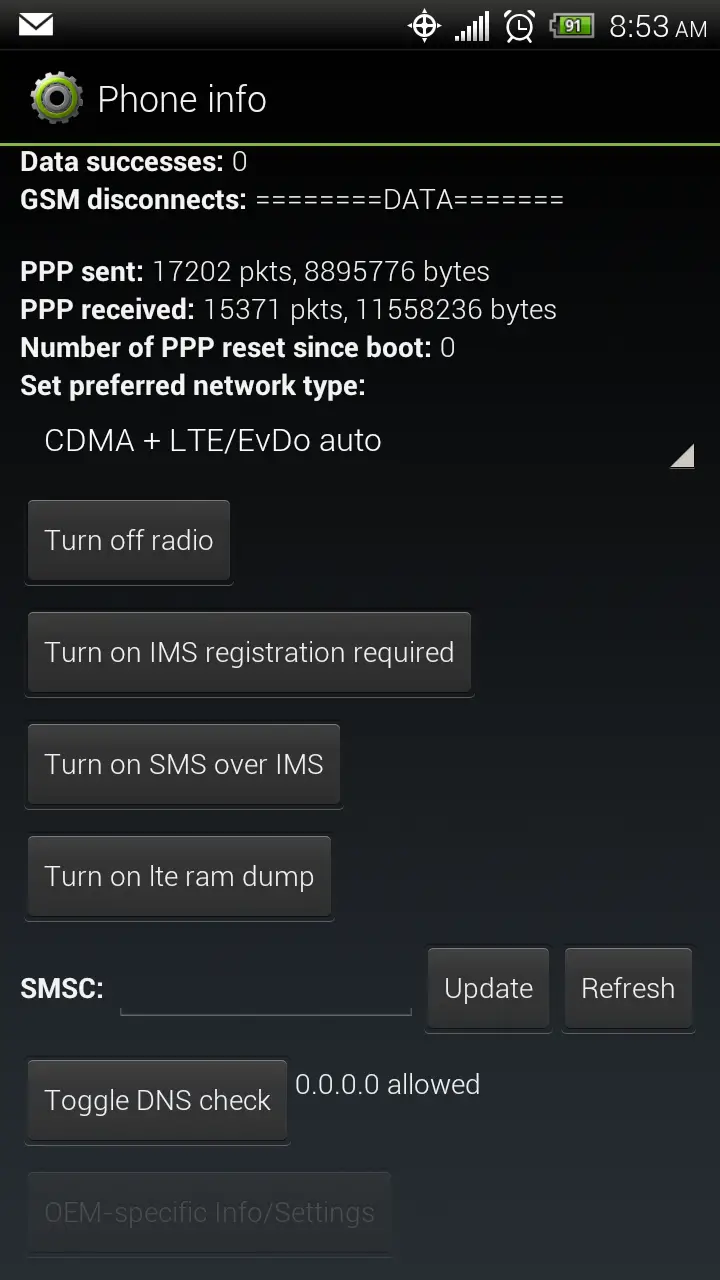
If you’ve been absolutely hating the 3G speeds on the HTC EVO 4G LTE, mykeyvee posted something at XDA that you might want to try. It doesn’t require root, and it doesn’t survive through a reboot, so if it doesn’t work for you, just reboot the phone.
The steps are pretty simple
- dial *#*#4636#*#*
- choose “phone information”
- Change preferred network type to CDMA/EvDo/GSM/WCDMA/LTE auto
- Tap the Toggle DNS check button to allow DNS to be 0.0.0.0
I tried this, running Speedtest.net’s app multiple times over the course of 10 minutes before and after the change and averaged an improvement of over 10% upload and download. Now, whether that’s due to the “fix”, prevailing wireless or internet conditions, or the number of birds, bees, and bombers between me and the tower – I have no way of testing.
For me, the internet doesn’t feel snappier or more responsive, but it does test better once it gets going. My battery also doesn’t drain any differently that I can see. Your mileage may vary.
Rooted folk, or people who want to call up Sprint and get their MSL may additionally want to change the proxy settings, which does stick through a reboot.
Let us know if this does anything for you. I’ve made and received calls and verified I’m not roaming, and I’m still supposedly getting 10%+ speed improvement. While not really making Sprint more usable, it appears to make the 3G slightly less horrid until Network Vision gets going in my area.


Just tried this (on Rejuv. ROM) and it worked very well. Went from 250-400kbps down to 1150 range. How can we make this last through a restart? And what exactly changed?
Not entirely sure, will be researching it more after work. All I know at the moment is I get measurable improvement, and reset it by rebooting.
What if we are running decks CM10? Same steps?
Thanks Paul. Also isn’t this a long standing “fix” for some time now. Believe I’ve done this with old evo4g?
Long time fix is turning off proxy servers (the msl requiring thing). I have no idea why this set of actions seems to speed things up, but it does.
C m 1 0 would be unable to do this as this is a sense based ROM action
I did the changes but how do you exit and make the changes “stick”?; i go back into ‘phone information’ and it shows the default values.
it doesn’t stick – every time you enter the app it’s back… you do it, leave the app… don’t look back
anyone who has root does not have to call sprint for their MSL, just use MSL reader from the play store
Paul thanks for this tip it is amazing is there anyway to make it permanent?
not that I know of yet..
I’m still a bit confused as to what it even should be doing..
I didn’t do a speed test, but I have to say I am experiencing a perceived difference. Could all be in my head, but it seems better after doing this technique.
On a related note, there is no doubt that my 3G is slower on my Evo LTE than was on my Evo 4G. Very frustrating. I know it’s been discussed here before; but what gives?
Saw my first Sprint 4g LTE speeds on the new Evo. It was in Northwest Indiana. I ran a bunch of speedtests. Download speeds were between 17 and 26 mbps. and Upload speeds between 10 and 12 mbps. Now if they can just turn on the rest of the network we can all be in bandwidth utopia.
Frank, where at in Indiana? I live near Indianapolis
Schereville and Munster indiana. I was shocked when my phone said 4G.
I tried the msl number from sprint and successfully changed the internet routing. It does stay through reboot. But my download speeds lowered. UPLOAD increased slightly. And you tube videos wouldn’t play stating connection interruption retry. I changed back to stock…slow internet sucks in NORTH CAROLINA.
Paul, it basically skips the sprint servers and gives you a different connectivity tower. My local tower was too bogged down. One about an hour away is where my phone wants to connect to when I did this trick. It is slower than my local sprint tower. Sad huh?
I did try this during lunch time and it seemed I had a slight improvement based on speed tests. However when I got home, I had all kinds of dns lookup issues…I suspect it was because I was on a different tower than the one that’s local to work. Had to reboot to undo the changes and get connected again.
Just turn the proxy servers off and don’t worry about this little trick. Problem solved.
just to clarify… i adjusted my proxy settings before doing this modification. I’m starting to think this is what gave me a huge improvement in speeds over the people that just do this mod without the proxy changes… good luck!
http://forum.xda-developers.com/showthread.php?p=30942675
ok I did something else you should try as well, after the mod, tap the menu button and then tap “get pdp list” and wait about thirty seconds before a speed test. this doubled my speeds. try it and repost!
There’s apps in the playstore that speed up internet speed. i have an evo 3d and it seems to work. just search increase internet speed or something like that and try out and see which app speeds up better for you
Works good! I can actually use navigation, and the internet.. I don’t have to use WiFi all the time now… Thanks a million!!