
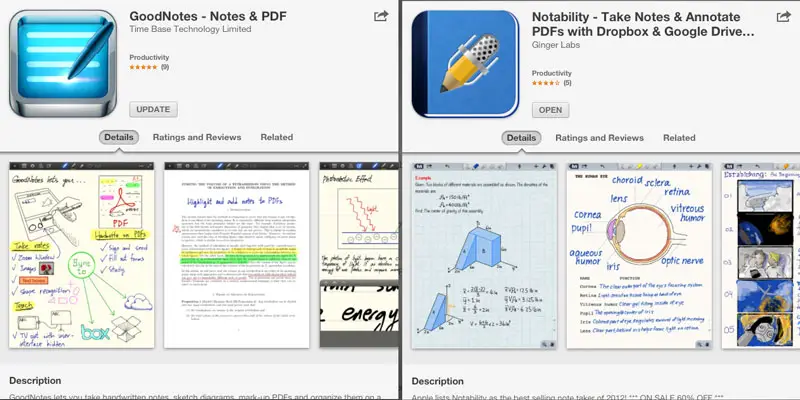
How Notability came close to replacing GoodNotes for me, but didn’t

A good note taking app is paramount for my tablet experience, and the reason why I eventually gave up the entire notion of an Android tablet. I’ve used GoodNotes on the iPad for ages now, but I do own a license for a ton of other apps, and I occasionally swing by them to see if recent updates have put them ahead of whatever I’m using at that moment.
That is exactly why I was recently messing around with Notability, another note taking app for the iPad. After familiarizing myself with the latest version of it, I started noticing why the name has popped up on so many recommendation lists lately; it has really improved since last I tried it. In fact, every feature I tried out seemed to work better than it does in GoodNotes, and I got really excited.
I particularly liked the automatic Dropbox sync, something GoodNotes is missing, leaving me sending files to Goodreader (which then syncs them to Dropbox). Another awesome feature in Notability is the ability to record audio, type text notes while recording, and then simply tap on your notes to immediately go back to that point in the recording. This is similar to a feature found on Livescribe pens, and it gives lecture recordings new life when you can use the audio recording that dynamically, rather than just sit there with one long audio file. Unfortunately, this feature doesn’t work with hand writing notes, which is very unfortunate. If it had managed to do this with handwritten notes, I might have at least partially switched to Notability, despite the reasons I’m getting to.
My first big gripe with Notability is that the zoom box that’s critical to writing accurately on a capacity touch screen. These boxes always have an auto-advance feature that moves the zoom box for you as you write, and there’s two ways of detecting when to move the zoom box: doing it when you come to the end of the box, or when you continue from the start. In Notability, there’s an adjustable area at the end of the zoombox, and when your writing gets into that area, the box moves- in an animated fashion that takes about half a second. In GoodNotes, that detection area is at the beginning of the box, so that it moves the box seamlessly when you start writing from the beginning of the box again. In practice, GoodNotes’ method means that you can continue writing right away, while Notability’s method forces a delay. You can see this in practice in the video below:
My second big gripe with Notability, and ultimately what made me decide to stick with GoodNotes, is how it handles external displays.
It doesn’t.
It has no support for external displays beyond standard iOS app mirroring, which is really disappointing. In GoodNotes, connecting to an external display throws the app into a dual screen mode. It then displays only the note/page on the external screen, hiding all controls. You can freely change tools, navigate the tool UI, and work on the iPad screen without distracting whoever is viewing the external monitor. You can even zoom and pan the two screens separately, meaning you can zoom around your iPad screen without giving the audience vertigo.
That particular feature is critical for using my iPad as a digital whiteboard for teaching, as it allows me to present a clean “whiteboard” on the projector, without all the tools, zoom box, and so on that I have visible on the iPad. I can also lock the zoom/pan of the external display on the first half of a page, and work on the second part on my iPad without that showing. This is for instance useful if you present a task on the first part, and then prepare the solution on the second while the students work on the task themselves. I’m not a math teacher, but has actually used this feature for helping someone with math, and it was incredibly useful.
I really like how Notability works and looks, but unfortunately, these two issues- particularly the last one- are just too major for me to live with them. Using both apps isn’t really an option, as I like to have everything in one place. I did send an email to the developer, explaining about the external display mode on GoodNotes, and got back a polite reply that essentially said “we’ll look into it.” That’s fine, but until it has been “looked into,” Notability is a no-go for me personally. I don’t know if it will even be added to the app at all, as it is after all a somewhat niche feature; mostly useful for teachers, and I think that a lot of teachers aren’t even aware of how useful it can be to have an app that has a dual screen mode.
Until next time, Notability.


