
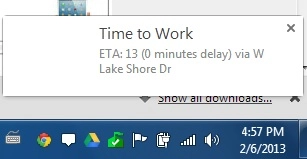
How to receive Google Now notifications in Google Chrome
 So, you may have heard all the fuss about the new notification center in Chrome. You may have also heard all the rumors about Google Now coming to Google Chrome. While the new notification center is still too young to be really functional, and not all of Google’s services are compatible with it yet, there is no reason you can’t start start playing around with it right now. In fact, within a matter of seconds, you can start receiving all of your Android notifications on your desktop or laptop running the Chrome browser or Chrome OS – including Google Now notifications.
First, if you want to receive these notifications in Google’s new notification center, you’ll need to enable rich notifications chrome://flags/ on your desktop. Otherwise, you’ll get the traditional, somewhat outdated looking notifications.
Next, you’ll need to download Android Desktop Notifications from the Chrome Web Store. This is a free extension that will run in the background while you’re using your browser, or while you’re booted into Chrome OS.
Third, you’ll need to download Dekstop Notifications from the Play Store on your Android phone (linked below).
Finally, simply open Android Desktop Notifications on your computer, find the pairing code that appears, and enter that code into the app on your phone. On your desktop, you can configure how long you want notifications to remain open, and on your phone, you can configure which apps you want to send notifications to Chrome.

That’s it! You can now receive Google Now notifications in Chrome, or notifications from any other Android app on your phone, for that matter, including missed call notifications, texts, and more. Granted, you can’t actually control your phone from your computer with this extension, and dismissing notifications on your computer won’t dismiss them on your phone.
But it’s still cool, nonetheless.
Download: Google Play


