
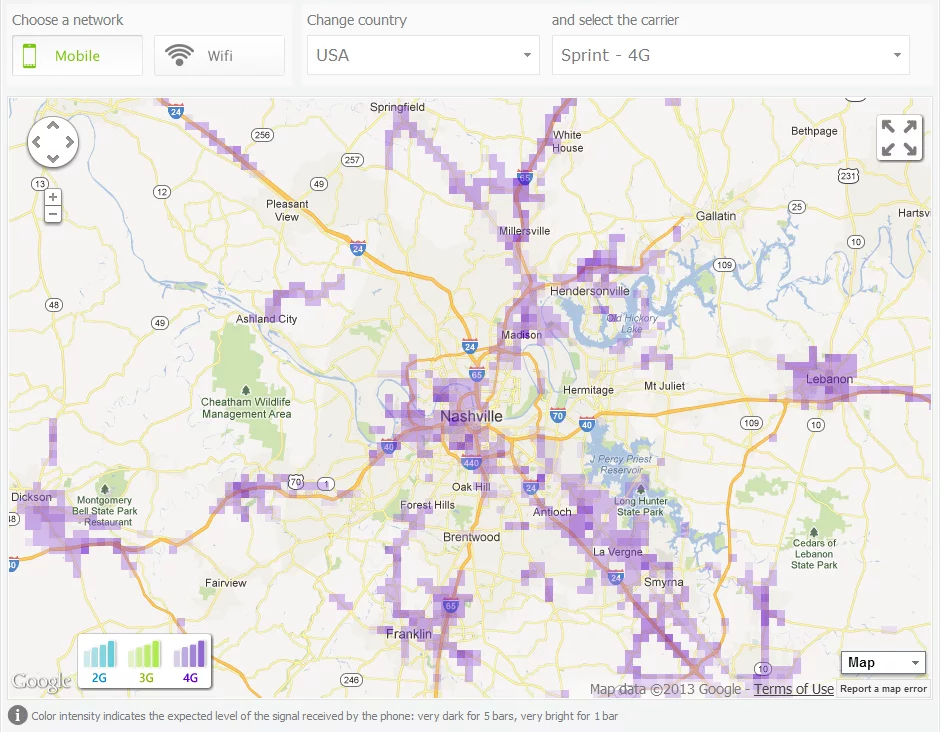
Sensorly is a web site and an app that will give you user-reported coverage maps based on carrier, G-level, and signal strength. And while I’m naturally focusing on Sprint and LTE here, if you’re on AT&T and wondering where some good 3G service is, you can find that out, as well.
The Sensorly website allows you to drill down coverage maps to voice, 2G-3G, 3G, WiMAX, 4G LTE, or see WiFi maps on networks that provide those. It is built on maps provided by the mobile app, which will share your connectivity experience and location as you travel, if you allow it.
Sensorly only appears to map what people have experienced, so the coverage maps are still limited by what someone with the Sensorly app might have run across. In my neck of the woods, that means most of the coverage that’s reported is people driving by on the interstate, and not in the cemetery which is right between the tower and the interstate, for example.
I’m not too big of a fan of the app in passive mode. It tends to turn the screen on to notify me that it’s doing something every few seconds when I’m driving, which drains the battery faster than I’d like it to. If you experience that, just take it out of passive reporting mode – that should take care of this issue and only report in when you want it to.
The app and website are great for finding out if you are near a location with high speed or better. This can be quite useful if you’re in an unfamiliar area.
The only thing I really wish Sensorly’s app could do is pre-cache an area for coverage. If you’re out in 2G land, trying to pull a coverage overlay can take forever, making it difficult to find a place where you can set up for a minute of work.
Sensorly’s website, which does not require you to use the app in order to view, is available at sensorly.com. The app is available for free in Google Play.
Download: Google Play



This app is very useful. I can see 4G spreading into my county on a daily basis.
Why no LTE options?
Apparently Sprint and 4G mean LTE.
Hmmm…ok i’m guessing that 4G means LTE? and just wimax means wimax or reg 4G
No this is no real help for LTE it shows wimax only!I live in Vegas and it is lit up there is no LTE in Vegas.
What options are you selecting? Las Vegas looking at WiMAX on Sprint = lit up, which it is. Las Vegas looking at 4G on Sprint = nothing.
Looked at it wrong.This makes me more mad looking at the map there is nothing much in the Western US.But Puerto Rico looks good….
I activated my EVO 4G LTE because Sensorly showed LTE really close to my house.
I got 4G the first day, all day. From 10mbps down/2mpbs up in my house, and 20 up/10 down in my backyard.
Since then, I my phone hasn’t changed from 3G. It won’t connect to the LTE antenna.
I hope since my area is not officially rolled out, that it is not an issue with my phone.
there’s LTE reported over the hill near my house. Ig get it two out of three times. Although Sensorly detected it, it doesn’t mean it’s officially up and running yet.
At my work, it’s generally up now, but in the early days of it coming online the signal appeared for 30 minutes or so then disappeared.
If this app is correct, there is a shitload of lte around my area.. i just have to move closer to the towers lol! my house is a dead zone for lte. Since its on route to my gym ill turn it on and see there.. but the lte coverage looked like the wimax(wimax was a larger area)coverage. But there was a lot in the bronx. Got my fingers crossed.
Big fan of this app and website. I check it every so often.
Ironically, there seems to be tiny Sprint LTE sites just above and below the borders of my state. It would be nice if that trickled down to where I am, soon.
I all too familiar with that map. Pretty much look at the LTE development around Nashville on a daily basis!
I was over at the Armory today (oddly for a Dell/Kace event) and it’s peeking through there now. Even caught it when I was at Staples.
Now i just have to locate a 4G strength indicator as the bars on the phone don’t register LTE strength.
When I was living in the Caribbean I used this App all the time to find the best locations to call from, and when I installed a cell repeater I used it to find the best location for the 20 ft antenna.
Living in a highly built out urban area (today) I don’t have as much use for it.. and have removed it from my devices so as to not wait disk space and CPU/battery.
This is accurate. Omw to the gym I turned on the late radio and I got a 4g signal I went to the network settings and the info was correct for the late signal I took screenshots I’ll upload after my workout
Well twice now ive tried using the 4g lte and i get the signal but its like im not even connected to the internet.. it doesnt do anything.. none of the pages load.. twitter fb ig, nothing. i dont know what is up with that..
The signal was probably too weak. The packet loss would be large and you’d get little to no throughput.
The LTE signal bars don’t show up on the EVO 4G LTE. It only shows 3G or 1X signal, unfortunately.
I was on the other side of my state the other day and I got to try Sprint’s LTE for the first time… I was blown away! Hopefully my market gets it very soon.
very nice site .. too bad no LTE in my area and I can finally see where exactly the spotty WiMax is available.
come on sprint, catch up !
Big fan of sensorly… it shows a lot of 4g in an area of my work in Belle Chasse, LA. I looked up the nearest sprint store and mapped it on sensorly, it shows a lot of 4g in that area so after work im gonna go try it out.
Found some LTE spots around my area using the app. Drove to the spots and LTE showed up on the phone. Nothing on the Sprint website shows the area being tested, but it worked. 8Mbps downloads.